Showing posts with label kindle dx. Show all posts

Wednesday, January 6, 2010

Kindle How-To: Using Text-to-Speech in Kindle DX


Your Kindle can read aloud your books (where allowed by the rights holder), newspapers, magazines, blogs, and personal documents with the Kindle Experimental application, Text-to-Speech.

To turn on Text-to-Speech, follow these steps:

  1. Press the Text key .

  2. Move the 5-way down so that the “Text-to-Speech” option is underlined. Press the 5-way to select “turn on.” In a few moments, you will hear your content spoken aloud. You can either listen to it through the Kindle’s external speakers or plug in earphones into the headphone jack.
  3. By default, content is spoken with a male voice, but using the 5-way, you can select a female speaking voice. You can also slow down or increase the rate of speech as well as pause or turn off Text-to-Speech.
  4. While Text-to-Speech is playing, the screen will update to the corresponding page of text.

For PDF files and books which the rights holder does not allow Text-to-Speech to read aloud their content, then “Text-to-Speech” will be grayed and you will not be able to select it.

By default, Text-to-Speech starts reading at the beginning of the page currently displayed. To start reading at a particular spot, move the cursor where you’d like the reading to begin before starting Text-to-Speech.

Tip: You can also play or stop Text-to-Speech by holding down the Shift key and pressing the Symbol key . You can pause and resume Text-to-Speech by pressing the Spacebar.

Buy Kindle DX (US Wireless)

Tuesday, January 5, 2010

Deliver notes to Kindle from EBeam Whiteboards


EBeam Whiteboard Delivers Notes To Kindle
Luidia, a company that designs and sells interactive electronic whiteboard solutions, is leveraging the display, portability and connectivity of Amazon’s Kindle to offer a new “Send to Kindle” feature that shoots whiteboard contents to an Amazon’s e-book reader.

The new “Send to Kindle” feature is part of Luidia’s eBeam software, which already allows for sending whiteboard information as a BMP, PDF or JPG file to a computer. This allows for review of important data when not at a computer, so there’s no long boot delay introduced — you simply flip your Kindle power on, enable the wireless radio and get to viewing what was on the whiteboard. The new “Send to Kindle” functionality supports both the Kindle 2 and the larger Kindle DX, which is targeted squarely at the education market. While this particular application is fairly specific, it shows the potential of devices as they become web connected.

Add to FacebookAdd to DiggAdd to Del.icio.usAdd to StumbleuponAdd to RedditAdd to BlinklistAdd to TwitterAdd to TechnoratiAdd to Yahoo BuzzAdd to Newsvine

Buy Kindle (Global Wireless)Buy Kindle DX (US Wireless)

Saturday, December 26, 2009

2-Year Extended Warranty for Kindle DX ( 9.7″ Display, U.S. Wireless, Latest Generation)

2-Year Extended Warranty for Kindle DX ( 9.7 Display, U.S. Wireless, Latest Generation) Manufacturer: Service NetCategory: CE

Buy Now: $109.00
Buy from amazon

Rating: 3.0 out of 5 stars

Media: Electronics
Legal Disclaimer: 2-Year Extended Warranty for Kindle DX available for any Kindle DX shipped in the past 30 days. Only available for U.S.-based customers. Offered and sold by Service Net, an industry-leading service management company. See Terms and Conditions for complete details. Full refund allowed within 60-days (provided there has been no claim activity), prorated refund allowed after 60-days.

Availability: Usually ships in 3-5 weeks

Features:

    Protect your Kindle DX (9.7″ Display, U.S. Wireless, Latest Generation) for two full years. Adds an additional year and more comprehensive protection than the one-year manufacturer’s warranty.
    Offers one-time coverage for accidental drops and damage.
    Hassle-free replacement of your Kindle DX for any device failures during normal operation. Includes free shipping both ways, for your damaged and replacement Kindle DX.
    Customer service and claim support available 6 am to 10 pm PT, 365 days a year — call (877) 441-3836 for warranty claims.
    2-Year Extended Warranty for Kindle DX is available for any Kindle DX( 9.7″ Display, U.S. Wireless, Latest Generation) shipped within the past 30 days. Only available to U.S customers.

Add to FacebookAdd to DiggAdd to Del.icio.usAdd to StumbleuponAdd to RedditAdd to BlinklistAdd to TwitterAdd to TechnoratiAdd to Yahoo BuzzAdd to Newsvine

Kindle How-To: Charging and Powering Up Your Kindle DX


Kindle DX ships with a U.S. power adapter and a Kindle micro-USB cable. You can charge your Kindle DX by connecting it to your computer via the Kindle micro-USB cable or by connecting it to a wall socket using the Kindle micro-USB cable and the Kindle U.S. power adapter plug. The light on your Kindle DX next to the USB socket will appear yellow when charging and change to green when Kindle DX is fully charged.

Note on third-party charging devices (not included with your Kindle DX): Third-party charging devices, power converters, USB wall chargers, and other charging hubs are not supported nor recommended for your Kindle DX.

Charging from Your Computer via Kindle Micro-USB Cable

When using the Kindle micro-USB cable to charge your Kindle via your computer, charging time will normally take 4 to 6 hours. To charge your Kindle DX from a computer via Kindle micro-USB cable:

  • Connect Kindle DX directly to a USB port on your computer. Do not connect through a hub, keyboard, or monitor.

    Illustration of Kindle connected to a computer via USB
  • Connect Kindle DX to a computer plugged into a power outlet. We recommend keeping your computer plugged into a power outlet while charging your Kindle DX. Your computer may not supply sufficient power to the USB port if it is not plugged in.
  • Make sure your computer stays on during the entire charging process. Disable Standby, Hibernate or Sleep mode, if necessary.
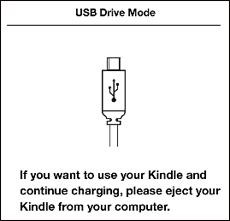
  • Verify Kindle DX recognizes the USB connection. You can verify your Kindle DX is charging if you see the USB drive mode screen. If you do not see this screen, unplug and reconnect your Kindle DX. You may also need to select an alternate USB port.

Illustration of Kindle screen when in USB drive mode.

Using Kindle while Charging via Kindle Micro-USB Cable

You can use your Kindle while it is connected and charging from your computer. For most operating systems, you simply need to select “unmount,” “eject” or “safely remove” for the Kindle USB drive using your computer’s file browser without actually disconnecting the USB cable. Kindle DX will then exit USB drive mode and display the Home screen. You’ll see a lightning bolt on the battery status icon that indicates Kindle is still charging.

If you use the Windows Vista operating system on your computer, using the “Safely Remove Hardware” command will not work. Use the “Eject” option instead. Click on the Windows Start button on your computer and select “Computer” from the options. Right-click on the Kindle drive icon and select “Eject” from the pop-up menu.

Using Kindle’s Power Switch

The Power switch on top of Kindle DX puts it to sleep, wakes it up, and turns your Kindle on or off.

To wake up or turn on your Kindle: Slide and release the power switch again.

To put your Kindle to sleep: Slide and release the power switch. (Other keys and buttons are locked in Sleep mode.)

To turn your Kindle off: Slide and hold the power switch for four seconds until the screen goes blank and then release.

To reset your Kindle: Disconnect your Kindle from any power source, and then slide and hold the power switch for 15 seconds before releasing.

Illustration of top of Kindle2 showing power button and sound port.

Tip: Your Kindle DX will also go to sleep by itself after ten minutes if you are not using it. If your Kindle had wireless on prior to going to sleep, it will continue to receive your regularly scheduled subscriptions while in sleep.

Buy Kindle DX (US Wireless)

Kindle DX is out of stock


Kindle DX is out of stock, Amazon expects to ship in 3 to 5 weeks. You can buy a Kindle (Global Wireless) with FREE shipping for $259.

Buy Kindle (Global Wireless) Buy Kindle DX (US Wireless)

Kindle DX drop test


Watch a Kindle DX drop test. This video shows a typical drop test, with Kindle DX being dropped from 30 inches (76cm).

Kindle DX drop test


Buy Kindle DX (US Wireless)

Sunday, December 20, 2009

M-Edge e-Luminator2 Kindle DX Booklight (Fits 9.7″ Display, Latest Generation Kindle DX)

M-Edge e-Luminator2 Kindle DX Booklight (Fits 9.7 Display, Latest Generation Kindle DX)

Brand: M-edge

Price: $24.99
Buy from amazon

Shipping Weight (lbs): 0.1
Dimensions (in): 4.8 x 0.5 x 9.5

Features:

   Lightweight and compact booklight works seamlessly with most of the M-Edge Accessories covers for Latest Generation Amazon Kindle DX
   Light stows in many M-Edge covers and easily pivots up to allow for optimal light positioning
   Powered with 1 AAA battery that provides more than 20 hours of use without dimming (battery not included)
   Optical lens spreads light evenly over Kindle screen, and Super Bright LED light bulb never needs replacing
   High and low light intensity settings allow for tailored screen illumination
   Fully adjustable flexible steel neck allows for fine tuning light position.

Editorial Reviews:

Product Description
The M-Edge e-Luminator2 booklight is the ultimate accessory for the Amazon Kindle. Based on the input of loyal M-Edge customers, this custom designed booklight has been developed to work seamlessly with the M-Edge Executive, Platform, Latitude and GO! Jackets for Latest Generation Amazon Kindle DX. The powerful light features a super-bright LED light bulb which provides ample illumination for the screen of the Reader screen while a mirrored reflector and optical quality lens disperses the light uniformly.The light is powered by a standard AAA battery (not included) with endurance enough for more than 20 hours of operation without dimming.The light is operated by a three position switch with two light intensity settings.A flexible and resilient steel neck allows the user to position the light in the desired direction.Perhaps the most impressive feature of this light is that it is designed to be stored via a slim support arm sized to match a pocket sewn into the back of many of M-Edge Jackets for the Amazon Kindle. The light pocket is conveniently located behind the Reader and does not interfere with the use of the Reader. When in the storage position, the light is located conveniently in the spine of the jacket so you can easily bring your light while on the go (for our Executive and Platform jackets). For our Latitude Jacket, there is a storage pocket to easily place your e-Luminator when not in use.

Customer Reviews:


1 out of 5 stars Would NEVER recommend   December 10, 2009
Nichole Hood (Boone, NC)
2 out of 3 found this review helpful

I bought this product at the same time as my kindle 2, and the m-edge cover. It all fits perfectly together but that is it. The light sputters on and off because the battery cover does not stay super tight. I had to tighten the battery cover about every 20 minutes with small pliars because you can’t finger tighten to it’s satisfaction. Even then as I am reading I have to put my thumb on the battery cover and try to keep it pushed snug. I am going to order something else today because I can’t fight with it anymore. I just wanted to warn everyone else beware.

3 out of 5 stars M-Edge e-luminator2 light (Kindle DX model)   December 3, 2009
Bucky (Massachusetts, USA)
3 out of 3 found this review helpful

M-Edge e-Luminator2 Kindle DX Booklight (Fits 9.7″ Display, Latest Generation Kindle DX)

The M-Edge e-luminator2 light (Kindle DX model) is cleverly designed and its off-white color matches the Kindle. However, there are some drawbacks.

First, the Pros:

- Lightweight
- Complements Kindle’s color
- Compatible with some (not all) M-Edge jackets, which makes it easy to carry (It may also be used with Amazon’s own Kindle cover by slipping the light’s tab between the Kindle and back cover.)

- Uses only one AAA battery (which keeps the weight down)

Now, for the Cons:

- Its one LED does not adequately light the Kindle DX’s big display real estate, even at the marginally brightest setting.

- As mentioned by many others, there is little difference between the two light intensities.

- The sliding switch is a little awkward to use, especially if you don’t have small hands.

Note: While I’m not crazy about this light for my wife’s Kindle DX, I do use it on my 6-inch Kindle (Global Wireless) with good results, i.e., you are able to light the entire display on the smaller Kindle. For the smaller Kindle, I would rate this light 4 stars.

The M-Edge e-luminator2 does not hold a candle (pun intended) to the Mighty Bright XtraFlex2 Clip-On Light, which I also have. (The trade-offs with the Mighty Bright are: 1) It’s a little heavier with its three AAA batteries. 2) It isn’t integrated into any cover design (which can also be an advantage, using it on any cover and real books), and it has to be carried separately. But, it puts out a hell of a lot of light!

Mighty Bright XtraFlex2 Clip-On Light (Kindle Version) Black [Amazon Frustration-Free Packaging])

Finally, don’t repeat my mistake. When I ordered this light it was for my Kindle GW. I didn’t notice that I was ordering the Kindle DX model. If you have the smaller Kindle and an M-Edge compatible cover, order the shorter M-Edge e-luminator2. (If you want to use it with Amazon’s Kindle cover, I recommend the longer lenghth DX model e-luminator2.) M-Edge e-Luminator2 Kindle Booklight (Fits 6″ Display, Latest Generation Kindle)

2 out of 5 stars Not as good as some of the competition…   November 27, 2009

Robert Liss (White Plains, NY USA)
It fits very well with the cover it’s designed for; but not built as well, and does not give nearly as good a light as some of the competition. Looks and feels flimsy….

5 out of 5 stars Great for reading in the dark   November 22, 2009
Janna Hinchman (El Segundo, CA, USA)
3 out of 5 found this review helpful

I don’t know why this product has so many negative reviews, except maybe it doesn’t meet the needs of Kindle DX. I wouldn’t know about that. I started with a Kindle 1 and now I have the Kindle 2 (6 inch). For my first Kindle I used the Mighty Bright. It worked, but it clips on the cover, so it doesn’t store or travel easily. Further, I couldn’t find a way to clip it on the same side of the cover as the kindle or else it would block part of the screen or hang on quite wobbly to the sides. I had to fold my cover backwards so that the front was the back and then clip it onto that. After a while of being on the outside, the nice inside suede was aged and old and not so good, and the cover didn’t seem to want to close back the right way.

For my second Kindle I got an m-edge cover and light. I LOVE them! I got the cover that stands up on its own. That is super. For the first kindle I had the one that is more like a book cover. It’s ok, but once I start a book, I want to read until I’m done. Unfortunately, I also have to eat, so the cover that stands up is very nice. For the Kindle 2 living in its m-edge cover, I got the m-edge light. As acknowledged by everyone, it does fit perfectly in the side of the cover. The light poses no threat to the Kindle and for me it does a great job of lighting up the screen. If the conditions are dark enough to require lighting, then I don’t want something so bright that it’s blinding or causes me to need time to adjust my eyes to my surroundings. I don’t want field lights or blinding lights. Too much light will give me a headache. The m-edge light does a great job of lighting up the Kindle 2 screen without blinding me or causing pain to my eyes. The light swivels so you can lay it flat when not in use or swing it up to arc over the top and shine a nice, even light over the screen. I think it is just right. Amazon and m-edge probably should give me commissions for the number of people that I have recommended the Kindle and m-edge cover/light combo!

2 out of 5 stars Nice Try, But No Cigar   November 5, 2009
Phil Geusz
3 out of 3 found this review helpful

I’ve owned a Kindle almost from the very beginning, and have unsuccessfully searched all of this time to find a decent light. When I upgraded to the Kindle DX, I thought I’d try this one. While it solves the portability problem well– the light stays nicely tucked in my M-edge cover without causing too many problems– two issues remain unsolved. The first is that this light simply isn’t bright enough, not by half. It needs a hi-lo power setting, but is permanently stuck on “low”. The other issue is that because the light emanates from an undiffused point source, it creates an annoying reflection on the Kindle screen. You can to some degree alleviate this by jiggering things around and experimenting with new angles, but the real problem is in the design of the reading light– and most other reading lights as well.

I’d still like to see a Kindle light with all the portability of this one, but based on the Light-Wedge reading light principle.

And… Kudos to M-Edge for making right-sized lights to fit the various Kindle sizes. I have great respect for such thoughtful engineering.

Buy from amazon